Before starting, load the required core packages from tidyverse
library(tidyverse)
── Attaching core tidyverse packages ──────────────────────── tidyverse 2.0.0 ──
✔ dplyr     1.2.1     ✔ readr     2.2.0
✔ forcats   1.0.1     ✔ stringr   1.6.0
✔ ggplot2   4.0.3     ✔ tibble    3.3.1
✔ lubridate 1.9.5     ✔ tidyr     1.3.2
✔ purrr     1.2.2
── Conflicts ────────────────────────────────────────── tidyverse_conflicts() ──
✖ dplyr::filter() masks stats::filter()
✖ dplyr::lag()    masks stats::lag()
ℹ Use the conflicted package (<http://conflicted.r-lib.org/>) to force all conflicts to become errors
library(lubridate)library(ggplot2)
4.3 Data Wrangling with dplyr
In this segment, we process raw billing data from iLab systems. We will clean test accounts, focus on completed/paid transactions, use the standard R native pipe |>, and parse timestamp strings into useful data features (Months and Quarter).
4.3.1 Downloading iLab Data
We are going to download our revenue reports from iLab for FY26. If you do not have access to this information in iLab, please use the data provided here.
4.3.2 Load in iLab Data
Now let’s load in our data as have done previously:
ilab_raw <-read.csv("data/module3_FY26_full.csv")
4.3.3 Clean iLab Data
We have our iLab data loaded into memory and stored in the vairable ilab_raw. However, if we inspect the data we will notice it is full of n/a, or just empty data points throughout the columns of the dataframe. We need to clean up the data and get it in a state that is useful for reporting an more informative for plotting.
We are going to accomplish this using the dplyr package bundled with tidyverse. Our goals are to:
Filter out internal test accounts (Customer Name != "Test Account"), and unpaid/cancelled invoices (payment_status == "Paid").
Parse timestamps into Month and Quarter using lubridate functions.
Format date categories cleanly for downstream visualization.
   Service.ID                                                   Service.Type
1 MGW-AG-4686 ddPCR, Probe Chemistry, full service, per column (1-8 samples)
2 MGW-AG-4686 ddPCR, Probe Chemistry, full service, per column (1-8 samples)
3 MGW-AG-4686 ddPCR, Probe Chemistry, full service, per column (1-8 samples)
4 MGW-CW-5260                                           Equipment Scheduling
5 MGW-CW-5260                                           Equipment Scheduling
6 MGW-CW-5260                                           Equipment Scheduling
  Asset.ID        Customer.Name   Customer.Title              Customer.Lab
1   464185      Alhussien Gaber                  Rogovsky, Artem (MSU) Lab
2   464186      Alhussien Gaber                  Rogovsky, Artem (MSU) Lab
3   335709      Alhussien Gaber                  Rogovsky, Artem (MSU) Lab
4   297792 Christopher Williams Graduate Student Hagler, Lauren (TAMU) Lab
5   297792 Christopher Williams Graduate Student Hagler, Lauren (TAMU) Lab
6   297793 Christopher Williams Graduate Student Hagler, Lauren (TAMU) Lab
  Customer.Department        Customer.Institute
1                     Michigan State University
2                     Michigan State University
3                     Michigan State University
4                          Texas A&M University
5                          Texas A&M University
6                          Texas A&M University
                                         Charge.Name       Notes Object.Code
1                               qPCR Setup (per run)                     638
2 qPCR Reaction, SYBR Green Chemistry (per reaction)                     638
3              Molecular Biology Lab Work (per hour) qPCR set up         638
4                   RNA Standard  Usage (per sample)                     638
5                   RNA Standard  Usage (per sample)                     638
6                          RNA HS Usage (per sample)                     638
  Invoice.Department    Status      Billing.Status Unit.of.Measure Total.Price
1               WSGI completed billing_initialized            each       46.00
2               WSGI completed billing_initialized            each       16.20
3               WSGI completed billing_initialized            each       48.90
4               WSGI completed billing_initialized            each        4.70
5               WSGI completed billing_initialized            each        9.40
6               WSGI completed billing_initialized            each       15.75
  Creation.Date Purchase.Date Completion.Date  Billing.Date
1 9/22/25 10:25 9/22/25 10:25   9/29/25 10:10 9/29/25 16:12
2 9/22/25 10:25 9/22/25 10:25   9/29/25 10:10 9/29/25 16:12
3 9/22/25 10:26 9/22/25 10:26   9/29/25 10:10 9/29/25 16:12
4  9/2/25 10:37  9/2/25 11:21   9/26/25 13:22 9/29/25 16:12
5 9/15/25 11:59 9/15/25 13:30   9/26/25 13:29 9/29/25 16:12
6 9/15/25 12:00 9/15/25 13:30   9/26/25 13:29 9/29/25 16:12
  Date.file.sent.to.ERP Billing.Event.End.Date           Created.By
1         9/30/25 03:00          9/29/25 23:59         Paola Galvan
2         9/30/25 03:00          9/29/25 23:59         Paola Galvan
3         9/30/25 03:00          9/29/25 23:59         Paola Galvan
4         9/30/25 03:00          9/29/25 23:59 Christopher Williams
5         9/30/25 03:00          9/29/25 23:59 Christopher Williams
6         9/30/25 03:00          9/29/25 23:59 Christopher Williams
                     Core.Name Invoice.Num No.Charge.Justification
1 Molecular Genomics Workspace MGW-5434204
2 Molecular Genomics Workspace MGW-5434204
3 Molecular Genomics Workspace MGW-5434204
4 Molecular Genomics Workspace MGW-5434218
5 Molecular Genomics Workspace MGW-5434218
6 Molecular Genomics Workspace MGW-5434218
  Ad.hoc.Charge.Justification Organization.Name Company.Organization.Name
1                                            NA                        NA
2                                            NA                        NA
3                                            NA                        NA
4                                            NA                        NA
5                                            NA                        NA
6                                            NA                        NA
  Charge.ID      Reviewed Center
1  66944650 No status set     NA
2  66944661 No status set     NA
3  66944683 No status set     NA
4  66453003 No status set     NA
5  66781694 No status set     NA
6  66781714 No status set     NA
                                              Category Usage.Type Vendor
1 Full Service - Reverse transcription & Real-time PCR        N/A     NA
2 Full Service - Reverse transcription & Real-time PCR        N/A     NA
3                       Full Service - Additional Fees        N/A     NA
4               Self Service - TapeStation/Bioanalyzer        N/A     NA
5               Self Service - TapeStation/Bioanalyzer        N/A     NA
6               Self Service - TapeStation/Bioanalyzer        N/A     NA
  UNSPSC.Code UNSPSC.Name Facility.Catalog.Number Central.Catalog.Number
1          NA          NA                      NA                     NA
2          NA          NA                      NA                     NA
3          NA          NA                      NA                     NA
4          NA          NA                      NA                     NA
5          NA          NA                      NA                     NA
6          NA          NA                      NA                     NA
  Core.ID                date month_num month_label quarter
1    3986 2025-09-29 16:12:00         9         Sep      Q3
2    3986 2025-09-29 16:12:00         9         Sep      Q3
3    3986 2025-09-29 16:12:00         9         Sep      Q3
4    3986 2025-09-29 16:12:00         9         Sep      Q3
5    3986 2025-09-29 16:12:00         9         Sep      Q3
6    3986 2025-09-29 16:12:00         9         Sep      Q3
4.4 Visualizing Revenue Trends with ggplot2
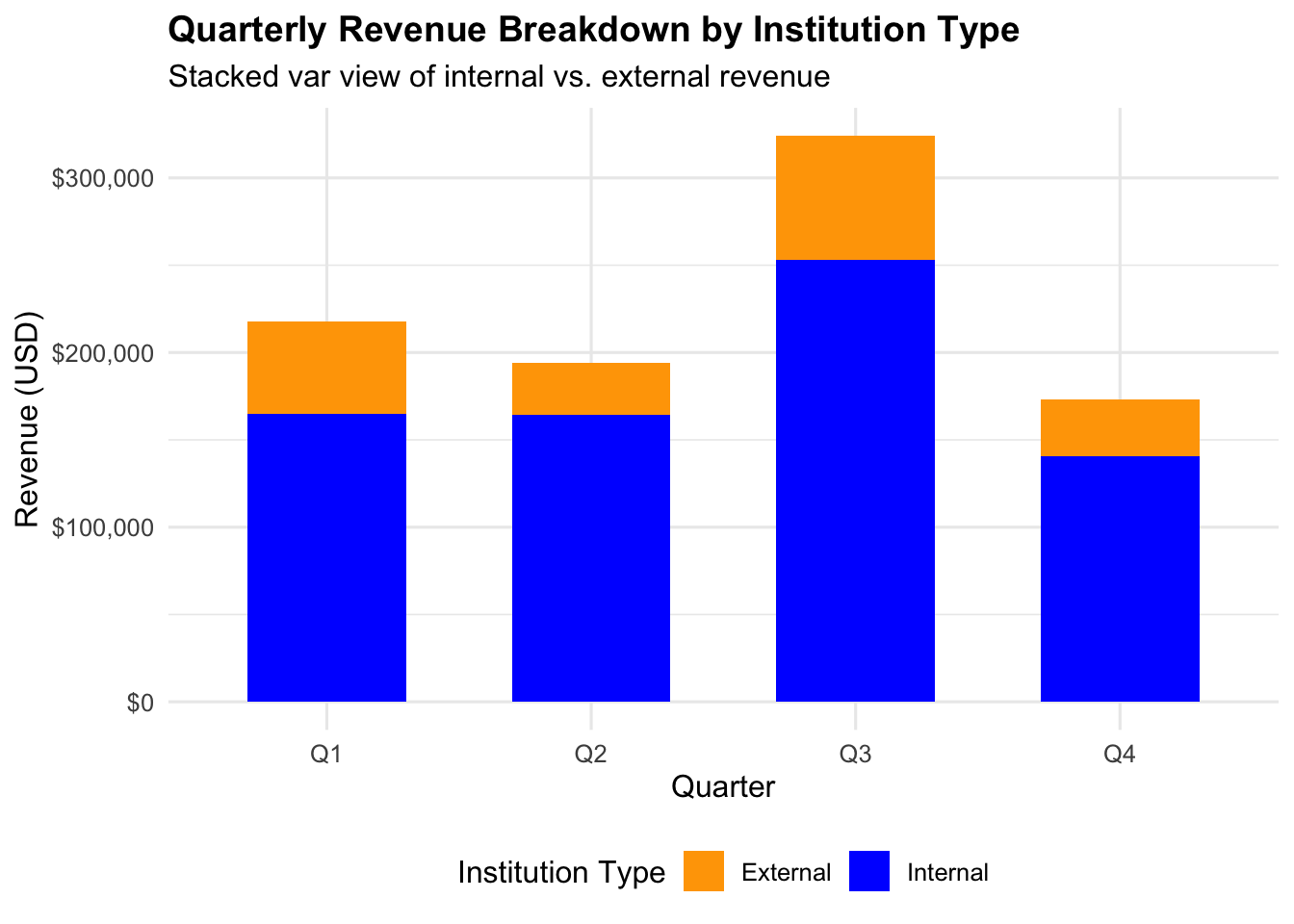
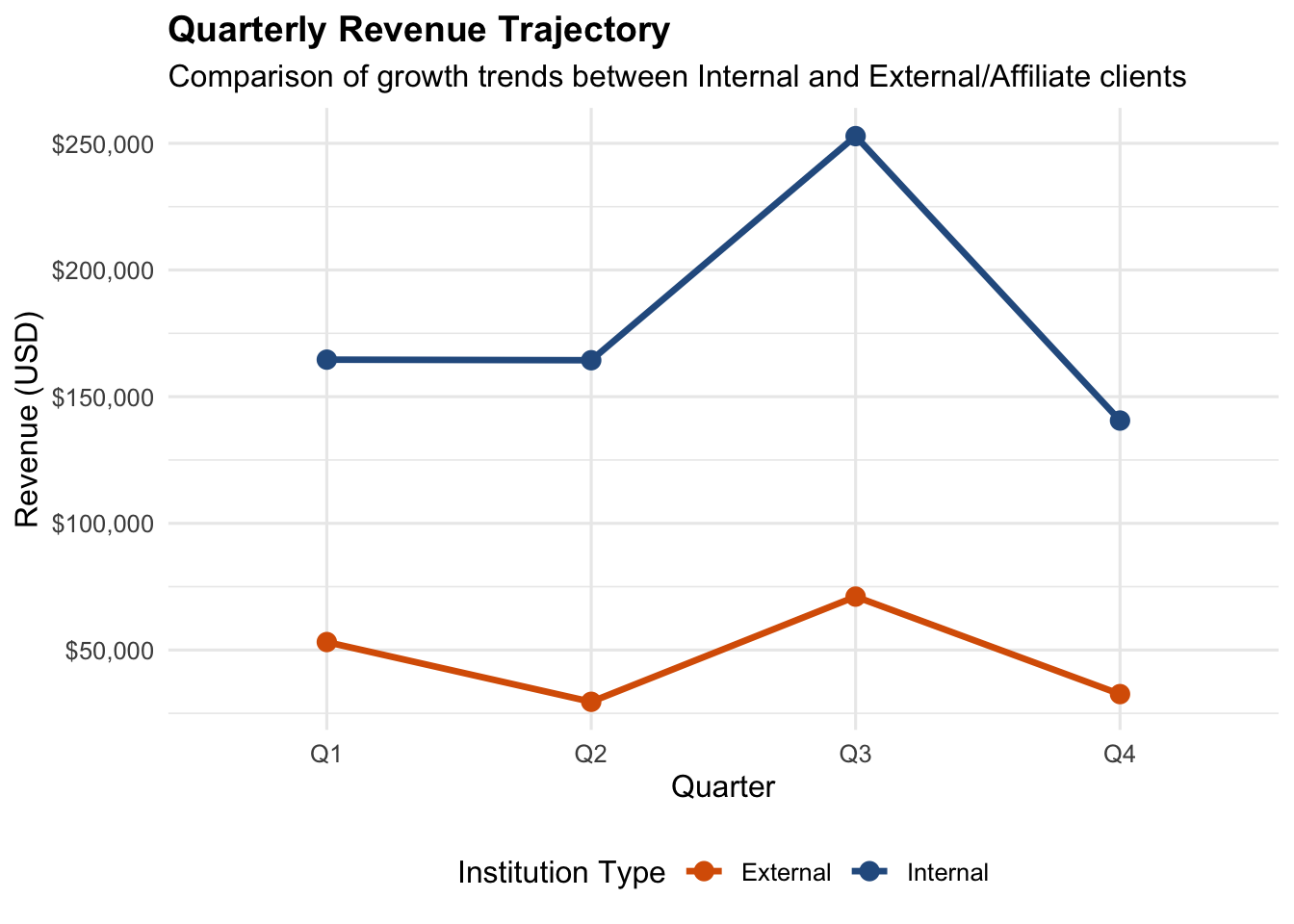
Now that our data is clean, we will aggregate revenue trends and build report-ready figures.
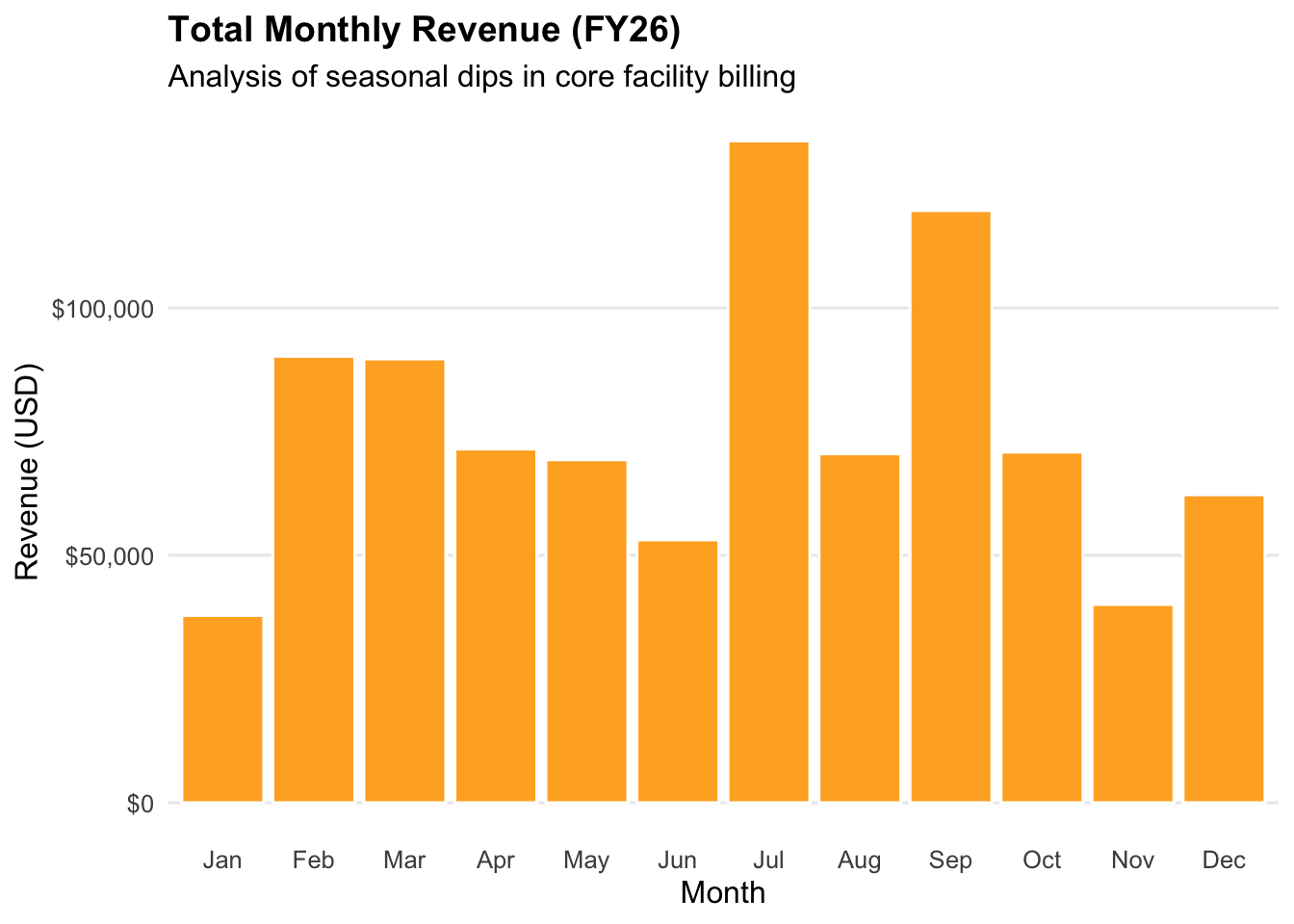
4.4.1 Monthly Revenue (Bar Chart)
To identify seasonal dips, we aggregate total revenue by month.